
New, Revolutionary Xperia Play Website
There is a brand new website that every Xperia Play user need to know about
XPERIA PLAY
Hey Comrade, welcome, pleasure to have you here🤘If you are a Xperia Play fan, this article is for you, because today we are talking about brand new website that recently came to an existence. I am talking about this Xperia Play focused website. It contains vital apks, zips and even multiplayer servers, and it can be fully accessed from stock Xperia Play built in web browser. That means this is the website to go right after you buy a brand new Xperia Play phone. You don't need PC or Phone to download stuff first and then transfer it over to your XP. That is a thing of a past. Now, all you need is your device, internet connection and that's it. That is what every enthusiast wants to hear - less hassle :-)
First I would like to say that it was created by Ryo over at the Xperia Play Discord, huge thanks to him. If you have a Xperia Play this is the place to join, because you can find there all the latest information, and on top of that they are taking the game preservation very seriously.
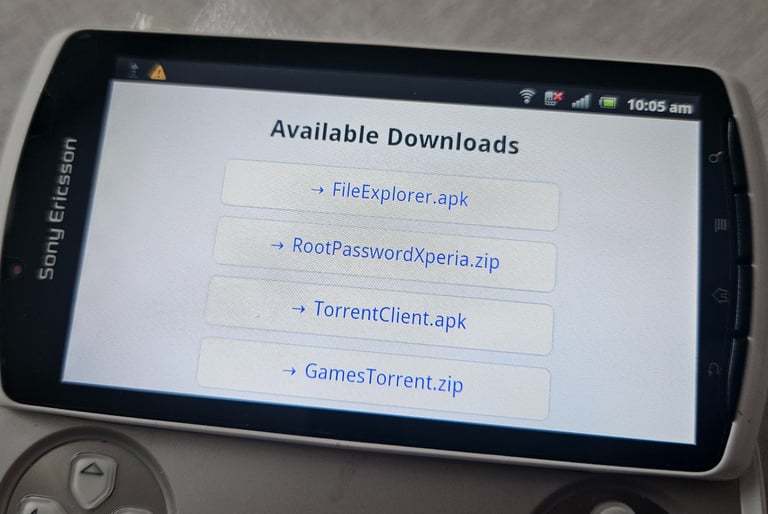
First thing you can find here is File Explorer. This is an essential tool that needs to be installed on your stock Xperia Play as the very first thing. You download it, install it and just then you gain access to all your internal storage. This is a big XP flaw, that it doesn't come with built in file explorer, luckily, the solution is now easier than ever
2nd option is RootPasswordXperia.zip. This is a set of tools that will root your device. This means you will gain full access (super user) and you can easily bypass manufacturer restrictions. One of this annoying restriction is that many games can only be installed on the internal storage and another big XP flaw is that the internal storage is very, VERY low. There is only 400MB available for all apps and games. Luckily, this restriction can be easily bypassed by something called Link2sd that you can find exactly in this .zip (alongside other necessary stuff like Es Explorer and Supersu).
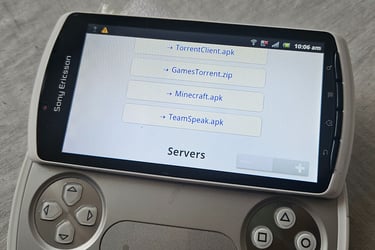
3rd and 4th options are TorrentClient.apk and GamesTorrent.zip. If you put 1 and 1 together, I think you can figure out what these are used for. Yes, you have guessed it. They are used for game preservation. There is no Play Store on the XP, it didn't exist back on android 2.3.4, but there is a non-functional Android Market, its predecessor, also good for nothing, and these two things serve as a substitute for the non-functional Play Store.
Then 5th option is Minecraft.apk. I am sure you know what Minecraft is, this is the Pocket Edition and it is the correct version for the very low XP android build. This is also very big issue in 2025 that all games need to be of an older version, not the latest, the version that is still compatible with XP device. Luckily, in the XP play discord, they are gathering and preserving only the correct and compatible versions.
6th, and the last option is TeamSpeak.apk. This one is used for voice chat
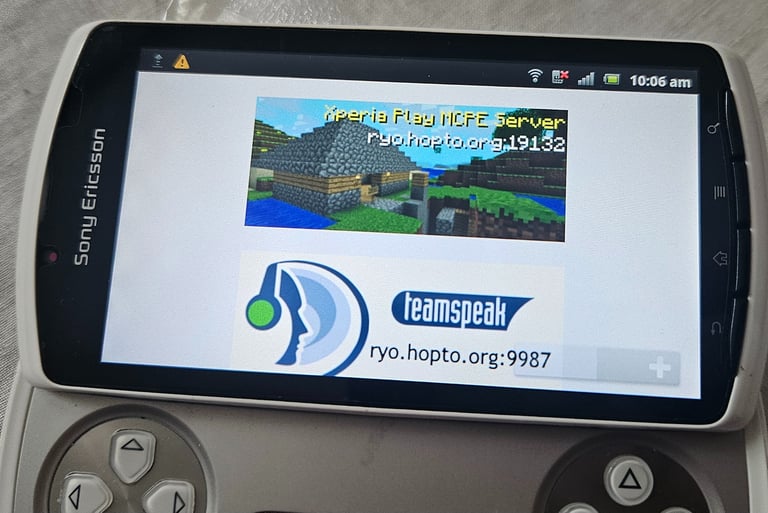
Last, but not the least, is the online multiplayer server for Minecraft PE that is still active to this day. You can hop in any time and have some fun, plus there is also TeamSpeak server, that you need to connect after installing the apk, to be able to use voice chat.
As I have mentioned already, in case you have any more questions or you are just looking for some inspiration, what else can you do with your Xperia Play, you should definitely join the XP Discord
This website is truly revolutionary, in my opinion, because it simplifies the process from stock os to a lot of fun by a lot. As I said, it is the first place to go right after you purchase your shiny, new XP. It will get you sorted in a matter of minutes, just with the device and with the internet connection. I am a big fan of this website. It is a great, very useful website, that I am sure every XP user can appreciate, so once again big up to Ryo for creating it🙏
That is it for this one, thanks for reading and I will see you soon, peace out✌️


Reframe your inbox
Subscribe to our newsletter and never miss a story.
We care about your data in our privacy policy.